A dear friend sent me this video. If you're a mom, I'm betting you'll like it as much as I did.
Friday, December 12, 2008

Thursday, December 11, 2008
Blog Management for Dummies: Scheduling Posts
Have you ever noticed that when you publish a post on blogger, that it posts with the day and time you first began to compose the post? For example, I began writing this post at 5pm on Wednesday, December 10. If I got interrupted (which almost always happens) and didn't get around to publishing until Thursday morning at 10am, the post time would still indicate Wednesday 5pm. This may not matter to you if you blog for fun and enjoyment. But if you blog in the pursuit of words of affirmation and the adoration of your bbffs like I do, you want your post to show the latest time so that it will appear at the TOP of your bbffs' blogrolls so they'll see it right away. If I left the post time at Wed 5pm and didn't publish until Thurs 10am, the post would appear on her blogroll as 19 hours old, which is an eternity in blog years.
So how do you fix that? Easy. Just change the post date and time.
While in the post editor (the place where you compose your posts) click on Post Options in the lower left corner of the editor.
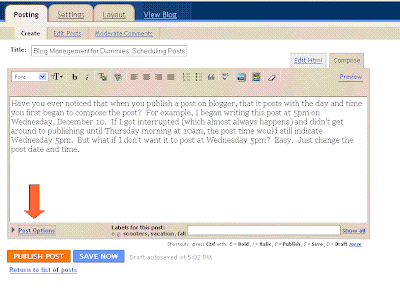 This opens a little menu that allows you to change the post date and time.
 This little menu also gives you the option to turn off comments for the post, although why anyone would ever want to do that is beyond me. Comments are a blogger's lifeblood. Unless you really don't want to hear people's opinions about the thing you've just posted. If that's the case, why post it at all then? I'm just sayin'.
If you would like to schedule a post to appear a day or two or several into the future, this is where you do it. Just type in the date and time you want it to publish, and then click on the BIG ORANGE "Publish Post" button like you always do.
Instead of the usual notification that your post has been successfully published, you will be taken to the "Edit Posts" page, with a yellow message that tell you "Your post will be automatically published on 12/11/08 at 6:00 AM". If you look at the top post on the list (which is actually this post), you will see the scheduled post with the date and "scheduled" in red.

Haha... I guess you can also see that I have three posts in "draft" that I haven't finished. When (or if) I finish them, I will have to be sure to change the date and time to a current or future date, otherwise that post will get published in chronological order which would bury it in the past and no one would ever see it. I've done this before. This is why I always view my blog immediately after publishing a new post to make sure that it is at the top of the page where it belongs. If not, I know that I've goofed up on the date somehow.
If this happens to you, just go to the edit posts page and click "Edit" next to the post you want, and then you can go in and adjust the date.
Oh, while I'm thinking about it, here is one other little bit of useful info about publishing. A couple of times I've published posts that I've regretted for one reason or another. Usually it's because I wrote something about my husband that made him grumpy, so to keep my marriage solvent, I went and "unpublished" those posts. It's easier than you think.
Just open the published post for editing, and then instead of pushing "Publish Post", click on the BLUE "Save as Draft" button. This will remove your posts from the blog and save it in your edit post list as a draft. Just like the button said.
You'll probably never need to do it. But just in case, Now You Know. And with knowledge, comes power.
So how do you fix that? Easy. Just change the post date and time.
While in the post editor (the place where you compose your posts) click on Post Options in the lower left corner of the editor.
 This opens a little menu that allows you to change the post date and time.
 This little menu also gives you the option to turn off comments for the post, although why anyone would ever want to do that is beyond me. Comments are a blogger's lifeblood. Unless you really don't want to hear people's opinions about the thing you've just posted. If that's the case, why post it at all then? I'm just sayin'.
If you would like to schedule a post to appear a day or two or several into the future, this is where you do it. Just type in the date and time you want it to publish, and then click on the BIG ORANGE "Publish Post" button like you always do.
Instead of the usual notification that your post has been successfully published, you will be taken to the "Edit Posts" page, with a yellow message that tell you "Your post will be automatically published on 12/11/08 at 6:00 AM". If you look at the top post on the list (which is actually this post), you will see the scheduled post with the date and "scheduled" in red.

Haha... I guess you can also see that I have three posts in "draft" that I haven't finished. When (or if) I finish them, I will have to be sure to change the date and time to a current or future date, otherwise that post will get published in chronological order which would bury it in the past and no one would ever see it. I've done this before. This is why I always view my blog immediately after publishing a new post to make sure that it is at the top of the page where it belongs. If not, I know that I've goofed up on the date somehow.
If this happens to you, just go to the edit posts page and click "Edit" next to the post you want, and then you can go in and adjust the date.
Oh, while I'm thinking about it, here is one other little bit of useful info about publishing. A couple of times I've published posts that I've regretted for one reason or another. Usually it's because I wrote something about my husband that made him grumpy, so to keep my marriage solvent, I went and "unpublished" those posts. It's easier than you think.
Just open the published post for editing, and then instead of pushing "Publish Post", click on the BLUE "Save as Draft" button. This will remove your posts from the blog and save it in your edit post list as a draft. Just like the button said.
You'll probably never need to do it. But just in case, Now You Know. And with knowledge, comes power.
Monday, December 8, 2008
Blog Management for Dummies: Comment Notification
It has recently come to my attention that some people suffer from blogging incompetency to such a degree that they do not have their blog set to email them when they get a new comment on a post they have written. The unfortunate people (who shall remain nameless) in this predicament must stalk their own blog waiting for the first comments, thereby wasting precious hours that could be better spent shopping for and mailing caramacs to their bbff's on the mainland.
As many of you know, when you visit someone's blogspot blog and leave a comment, you have the option of having follow up comments sent to you via email, which frees you from having to return to the blog itself to keep up on the comments that come after yours.
But there is a setting for blog owners that will send every comment made on any post at any time to your email, thus enabling the owner to know immediately when that first comment comes in. This is how it is done.
First, click on the Customize link in the upper right corner of your browser window:

Then select the Settings tab:

Choose the fourth option, the Comments link:

 Then scroll down to the bottom of the screen until you see "Comment Notification". Type the email address (es) that you want notifications sent to.
 THEN -- and this is VERY important -- press the orange "SAVE SETTINGS" button at the bottom. Viola! Henceforth and forever, you will receive an email in your inbox alerting you to all the witty and clever comments made on any post you've ever posted on your blog. Annoying, rude, and/or boring comments will be sent to your trash folder.
This will free you of having to remember to check the "send follow up comments to your email address" for your own blog. Of course you can still do that, and then you'll get TWO email notifications of every new comment on your blog. If words of affirmation are your primary love language, you may consider this to be a good thing because you'll feel twice as popular as you really are. Embrace the fantasy, I say.
Blog long and prosper, my friends.
As many of you know, when you visit someone's blogspot blog and leave a comment, you have the option of having follow up comments sent to you via email, which frees you from having to return to the blog itself to keep up on the comments that come after yours.
But there is a setting for blog owners that will send every comment made on any post at any time to your email, thus enabling the owner to know immediately when that first comment comes in. This is how it is done.
First, click on the Customize link in the upper right corner of your browser window:

Then select the Settings tab:

Choose the fourth option, the Comments link:
 Then scroll down to the bottom of the screen until you see "Comment Notification". Type the email address (es) that you want notifications sent to.
 THEN -- and this is VERY important -- press the orange "SAVE SETTINGS" button at the bottom. Viola! Henceforth and forever, you will receive an email in your inbox alerting you to all the witty and clever comments made on any post you've ever posted on your blog. Annoying, rude, and/or boring comments will be sent to your trash folder.
This will free you of having to remember to check the "send follow up comments to your email address" for your own blog. Of course you can still do that, and then you'll get TWO email notifications of every new comment on your blog. If words of affirmation are your primary love language, you may consider this to be a good thing because you'll feel twice as popular as you really are. Embrace the fantasy, I say.
Blog long and prosper, my friends.
Thursday, December 4, 2008
Nothing to do but fret
Yesterday I got a cortisone shot in my troublesome knee that decided to swell and be generally annoying with only 10 days to go to recital. The doctor was awesome (thanks to Andrew for getting me in to see her!) and almost immediately my range of motion was improved. She sent me home with some painkillers and an order to stay off it AMAP for 24 hours and told me I'd be dancing again by Saturday. That gives me a week left to get my routines polished before going on stage on December 13. I guess that will have to be good enough.
Yesterday my favorite mother-in-law had breast cancer surgery. The cancer has spread farther than they had hoped, and so she'll have to follow up with radiation and chemotherapy. I am worried about her and wish there was something I could do to help. Sending flowers seems like such a paltry offering in the face of such a serious illness, you know?
Today my best friend's 4-year-old son goes under the knife to remove a thyroglossal duct cyst. I know! I had no idea what it was either. His parents are understandably very concerned about him. I am concerned about my friend. Again, there is not a thing I can do.
So I'll sit here and worry and wait for news while I worry and wait for my knee to feel better. I need a good book or something.
Yesterday my favorite mother-in-law had breast cancer surgery. The cancer has spread farther than they had hoped, and so she'll have to follow up with radiation and chemotherapy. I am worried about her and wish there was something I could do to help. Sending flowers seems like such a paltry offering in the face of such a serious illness, you know?
Today my best friend's 4-year-old son goes under the knife to remove a thyroglossal duct cyst. I know! I had no idea what it was either. His parents are understandably very concerned about him. I am concerned about my friend. Again, there is not a thing I can do.
So I'll sit here and worry and wait for news while I worry and wait for my knee to feel better. I need a good book or something.
Monday, December 1, 2008
Death by Tuna... almost
For Thanksgiving we traveled to Idaho to visit with my side of the family. We had a very pleasant afternoon at my cute niece's house, eating scrumptious food, playing cards and Wii, and doing puzzles. We then spent the night with my dad at his home.
Friday morning we slept in, dad cooked breakfast, and then the kids bundled up to go out and ride the four wheeler ATV on the farm. As noon approached, we began packing up to return home.
Knowing that we like tuna sandwiches, dad mixed up a big bowl of tuna. Nathan was thrilled and proceeded to make himself a thick sandwich. Everyone settled down to eat lunch. I had eaten a big breakfast and so wasn't really hungry, so I politely declined.
Everyone began to eat, and it was oddly silent around the table. Being absorbed in my laptop, as usual, I didn't notice the furtive looks exchanged among the kids. Then Nathan said, "Mom, do you want the rest of my sandwich?" He had only taken two bites. Strange, for a kid who likes tuna as much as he does. "Why, don't you like it?" He shrugged. "I'm just not that hungry, I guess."
I didn't want his sandwich, so he tossed it in the garbage. A little while later, I noticed that there were four sandwiches with only a couple of bites out of them in the garbage. Hmmmm. Suspicious.
I took a spoon and tasted the tuna. Whoa. There was something seriously wrong with this tuna. At first I thought that dad had made it with mayonnaise or something equally nasty. Then I realized the taste of tuna was overwhelmed by a strong bitter metallic taste! No wonder the kids couldn't eat more than a few bites; I couldn't even swallow the little bit in my mouth!
I mentioned the off flavor to my dad, and he tasted it and agreed that something was wrong with it. "I'll go check the date on that case," he said, as he headed for the basement.
The tuna was old, alright.
How old, you ask?
Well, I'll tell you.
Wait for it.
Sheesh, but you are impatient.
The case of tuna was purchased in...
1972!
Ack! My kids ate 36 year old tuna for lunch!
I think my dad is living in a time warp. He still wears polyester shirts from the 70's and sees nothing wrong with that. He just finished restoring a 1947 Garwood boat after 2 1/2 years of working on it. I love ya dad, but let's face it: you are o-l-d. Older than the Moonwalk. Older than Elvis. Older than The Garden of Eden. Older than dinosaurs. Older than DIRT.
I'm older than your tuna. But just barely.
Love you dad! :waves:
Friday morning we slept in, dad cooked breakfast, and then the kids bundled up to go out and ride the four wheeler ATV on the farm. As noon approached, we began packing up to return home.
Knowing that we like tuna sandwiches, dad mixed up a big bowl of tuna. Nathan was thrilled and proceeded to make himself a thick sandwich. Everyone settled down to eat lunch. I had eaten a big breakfast and so wasn't really hungry, so I politely declined.
Everyone began to eat, and it was oddly silent around the table. Being absorbed in my laptop, as usual, I didn't notice the furtive looks exchanged among the kids. Then Nathan said, "Mom, do you want the rest of my sandwich?" He had only taken two bites. Strange, for a kid who likes tuna as much as he does. "Why, don't you like it?" He shrugged. "I'm just not that hungry, I guess."
I didn't want his sandwich, so he tossed it in the garbage. A little while later, I noticed that there were four sandwiches with only a couple of bites out of them in the garbage. Hmmmm. Suspicious.
I took a spoon and tasted the tuna. Whoa. There was something seriously wrong with this tuna. At first I thought that dad had made it with mayonnaise or something equally nasty. Then I realized the taste of tuna was overwhelmed by a strong bitter metallic taste! No wonder the kids couldn't eat more than a few bites; I couldn't even swallow the little bit in my mouth!
I mentioned the off flavor to my dad, and he tasted it and agreed that something was wrong with it. "I'll go check the date on that case," he said, as he headed for the basement.
The tuna was old, alright.
How old, you ask?
Well, I'll tell you.
Wait for it.
Sheesh, but you are impatient.
The case of tuna was purchased in...
1972!
Ack! My kids ate 36 year old tuna for lunch!
I think my dad is living in a time warp. He still wears polyester shirts from the 70's and sees nothing wrong with that. He just finished restoring a 1947 Garwood boat after 2 1/2 years of working on it. I love ya dad, but let's face it: you are o-l-d. Older than the Moonwalk. Older than Elvis. Older than The Garden of Eden. Older than dinosaurs. Older than DIRT.
I'm older than your tuna. But just barely.
Love you dad! :waves:
Subscribe to:
Posts (Atom)